If you have been building AI agents that actually do things (not just chat), you have already hit the wall. Your agent needs to pull data from ESPN, search flights across Google and Kayak simultaneously, or verify a prospect's email through LinkedIn. And every single time, you end up wrestling with bloated API responses, token limits, and MCP servers that choke on complex tasks.
The Printing Press is an open source CLI factory built by Matt Van Horn and Trevin Chow that takes a completely different approach. Instead of wrapping APIs in more abstraction layers, it generates lightweight, purpose built command line tools that AI agents can call directly. Think of it as a printing press for agent infrastructure: feed it any API spec, website URL, or browser traffic capture, and it spits out a production ready Go CLI, a Claude Code skill, an OpenClaw skill, and an MCP server. All from a single command.
The project already ships with 50+ pre built CLIs across categories like commerce, travel, media, developer tools, and productivity. It has 1,400+ stars on GitHub. And the numbers behind its performance tell a story that every AI builder needs to understand.
The Core Problem: Agents Waste Tokens on Infrastructure
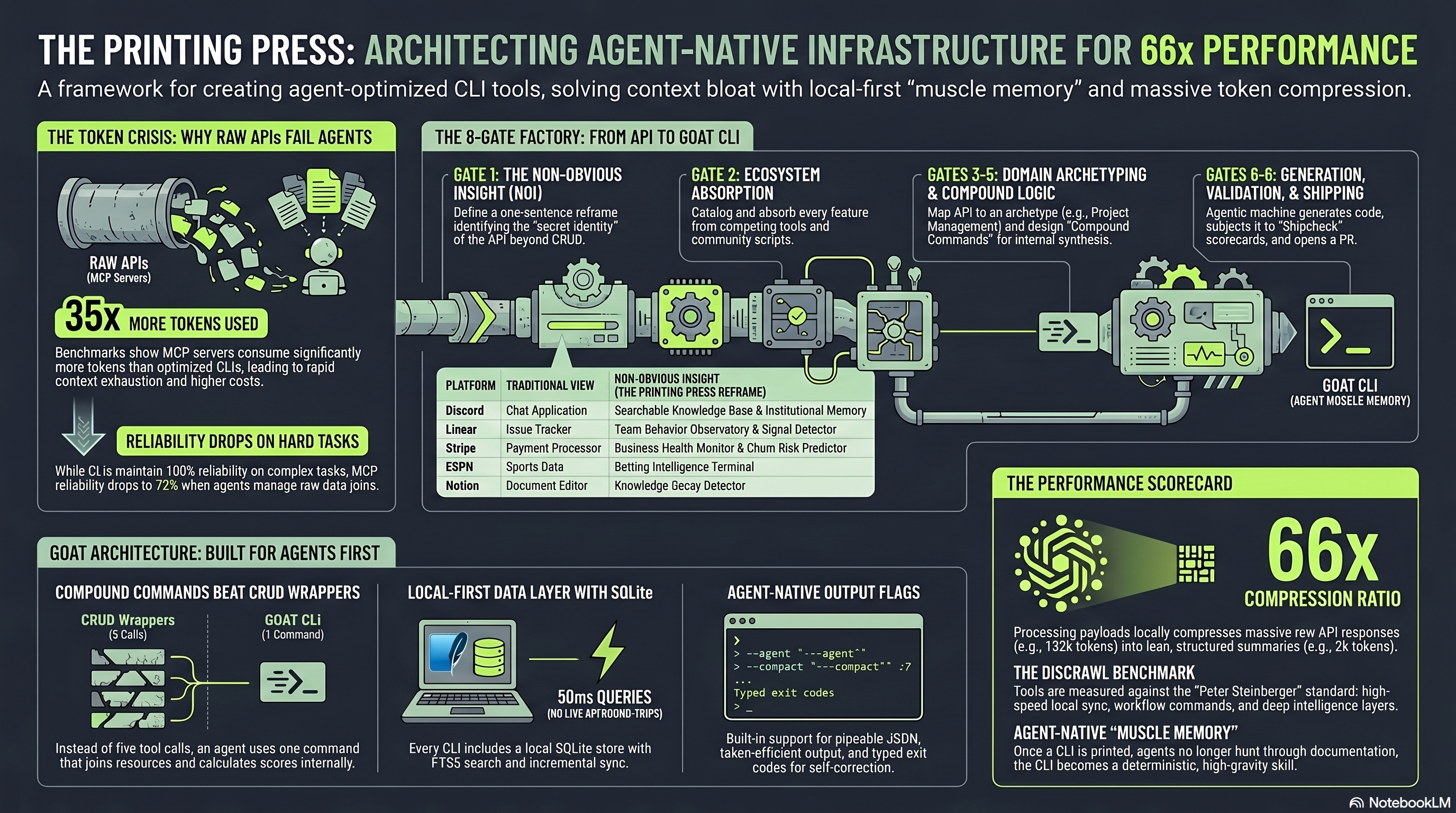
Here is a stat that should make you uncomfortable. MCP servers use roughly 35x more tokens than equivalent CLI tools performing the same task. That is not a marginal difference. That is the difference between an agent workflow that costs $0.50 per run and one that costs $17.50.
But it gets worse. According to benchmarks published by the Printing Press team, MCP server reliability drops from 100% to around 72% as task complexity increases. The agent is not just spending more tokens. It is also failing more often on harder tasks, which means even more tokens wasted on retries.
The root cause is architectural. When an agent calls an MCP server, it has to load massive tool schema definitions into its context window, parse bloated JSON responses, and maintain a persistent server process. A CLI call is simpler: input goes in as a shell command, output comes back as clean text, and the agent moves on. No schema overhead. No server to keep alive. No wasted context.
How the Printing Press Actually Works
The framework follows a four phase pipeline that the team calls the Lean Loop. Here is what happens when you point it at a target:
Phase 1: Research and Absorb. The factory LLM visits the target site, reads its OpenAPI spec if one exists, and studies every competing tool, MCP server, and community CLI that already covers this service. It does not just duplicate what exists. It catalogs everything so the generated CLI absorbs and transcends prior solutions.
Phase 2: Catalog. Before any code is written, the system lists every interaction point it discovered. The developer reviews the scope, confirms the features worth including, and moves forward.
Phase 3: Generate. Using a Go based code generator, it writes the full codebase. A single run produces four outputs: a standalone Go CLI binary, a natural language skill file for Claude Code, an OpenClaw skill, and an MCP server. All from the same specification.
Phase 4: Verify. This is where it gets interesting. The system runs what it calls "dog food" runtime verification. It actually invokes the CLI it just built, tests the outputs, scores them for correctness and formatting, and flags anything broken. You do not ship until the CLI proves it works.
The entire process takes roughly 10 minutes for most targets.
The SQLite Mirror Layer
Every CLI generated by the Printing Press backs itself with a local SQLite database. Instead of hitting the remote API on every single call, the CLI syncs data locally and runs queries against the mirror. Compound queries that would normally require multiple API round trips execute in milliseconds.
This is not caching. This is a full local data store with text search capabilities. It means your agent can run SQL joins across datasets, track changes over time, and perform analysis that the original API was never designed to support.
Real World Use Cases (From Production)
Enough theory. Here is what people are actually building with the Printing Press, pulled directly from the official library and documented case studies.
1. ESPN Sports Data Without an API
ESPN has no public API. Full stop. If your agent needs live scores, standings, injury reports, or playoff series data, you have historically been stuck scraping HTML or paying for a third party data provider.
The Printing Press solved this by using its Browser Sniff Gate. It launches a real Chrome session, captures the network traffic between the browser and ESPN's internal endpoints, reverse engineers the API from the captured HAR file, and generates a CLI around it.
The result? One command returns tonight's NBA playoff games with live scores, series state, each team's leading scorer, and injury news from the past 24 hours. All in a single call. All formatted as a compact text summary your agent can consume without drowning in JSON.
2. flight-goat: Two Flight Sources, One Query
Searching for cheap flights normally means your agent has to navigate Kayak's interface, then separately query Google Flights, then somehow merge the results. That is three integration points, each with their own quirks.
The flight-goat CLI stitches both sources into a single ranked result set. You ask for nonstop flights over 8 hours from Seattle for 4 passengers, December 24 to January 1, sorted by price. The CLI queries both services locally, joins the data in SQLite, deduplicates, ranks, and returns a clean output. Two sources, one query, zero token waste on navigation overhead.
3. Contact Goat: Verified Emails from LinkedIn Without a Public API
Finding a verified professional email usually means chaining LinkedIn Sales Navigator, a data enrichment tool, and a separate email verification service. Three SaaS subscriptions. Three integration points. Thousands of tokens per lookup.
Contact Goat collapses this into one CLI command. It looks up the prospect on LinkedIn (without a public API), cross references the data with Happenstand for enrichment, and runs a deep email deliverability verification pass. The output? A clean 200 token result with the person's name, title, verified email, and a confidence score.
The School.com case study illustrates the compression ratio best: a fetch that returned 132,000 tokens of raw data from the server was processed locally by the CLI and delivered as just 2,000 tokens of structured summary to the agent. That is 66x token compression.
4. Apartments.com: Workflows the Website Never Built
Apartments.com has a search interface. What it does not have is the ability to diff saved searches, rank listings by price per square foot, compare shortlists side by side, surface price drops between syncs, or detect phantom listings (units that keep getting re-posted to look like fresh inventory).
The Apartments.com CLI, built by a community contributor, syncs listing data to a local SQLite store and exposes all of those workflows as compound commands. The analysis runs locally, instantly, and returns only the actionable insights your agent needs. Try doing that with a stateless API wrapper.
5. Company Goat: SEC Funding Data That Replaces a $999/Year Subscription
Here is a fact most people outside securities law do not know: most US startups raising priced equity rounds file Form D with the SEC within 15 days of their first sale. Those filings are public, structured as XML, and free to query. Crunchbase Pro charges $999 per year for what is substantially a wrapper around this same source.
Company Goat extracts funding data directly from SEC EDGAR. One command gives you the offering amount, the exemption claimed, and the related persons (officers, directors, promoters) for any company. It fans out across seven free authoritative sources in a single call. No API keys required for the core feature.
6. Sentry Error Tracking Across Projects
The Sentry CLI mirrors your error tracking data into a local SQLite database, then lets you run SQL queries across multiple organizations and projects. The killer command: find every issue first seen in the latest release whose error rate is climbing across two separate projects. That is a cross project join that Sentry's own API cannot perform in a single call.
Why This Matters for AI Automation Builders
If you are building n8n workflows, Vapi voice agents, or any kind of autonomous system that touches external data, the token economics of your agent's tool layer are not a nice to have concern. They determine whether your solution scales or collapses under its own cost.
The Printing Press represents a fundamental architectural shift. Instead of the agent doing the heavy lifting of navigating APIs and parsing responses, the CLI does the work locally and feeds the agent only what it needs. The agent stays focused on reasoning and decision making. The CLI handles the messy reality of data retrieval.
For automation agencies and solo builders serving clients, this opens up use cases that were previously too expensive or too fragile to deliver reliably. An agent that can query ESPN, verify emails, track apartment prices, and analyze SEC filings, all through lightweight CLI calls, is a fundamentally different product than one duct taped together with REST API wrappers.
How to Get Started
The fastest path is the starter pack. One command installs four pre built CLIs (ESPN, flight-goat, movie-goat, and recipe-goat):
npx -y @mvanhorn/printing-press install starter-packYou will need Go installed (free, open source, takes about a minute to set up). From there, you can browse the full library at printingpress.dev and install any of the 50+ available CLIs.
To build your own CLI for a service that is not in the library, you install the factory and point it at your target:
printing-press generate --url https://example.comThe factory handles the research, cataloging, code generation, and verification. Your job is to review the scope and confirm the features. The entire factory pipeline is documented on the GitHub repository.
The Bottom Line
The AI agent infrastructure layer is undergoing a quiet but significant shift. The question is no longer "how do I connect my agent to this service?" It is "how do I connect my agent to this service without burning through my token budget and crashing on complex tasks?"
The Printing Press answers that question with a philosophy borrowed from Unix: do one thing well, compose through pipes, and keep the interface dead simple. Except now, the user is not a human typing in a terminal. It is an AI agent executing compound workflows across dozens of services.
That changes everything.
Interested in AI automation for your business? Explore our automation services at SocialVik or reach out to discuss how agent native tooling can transform your workflows.