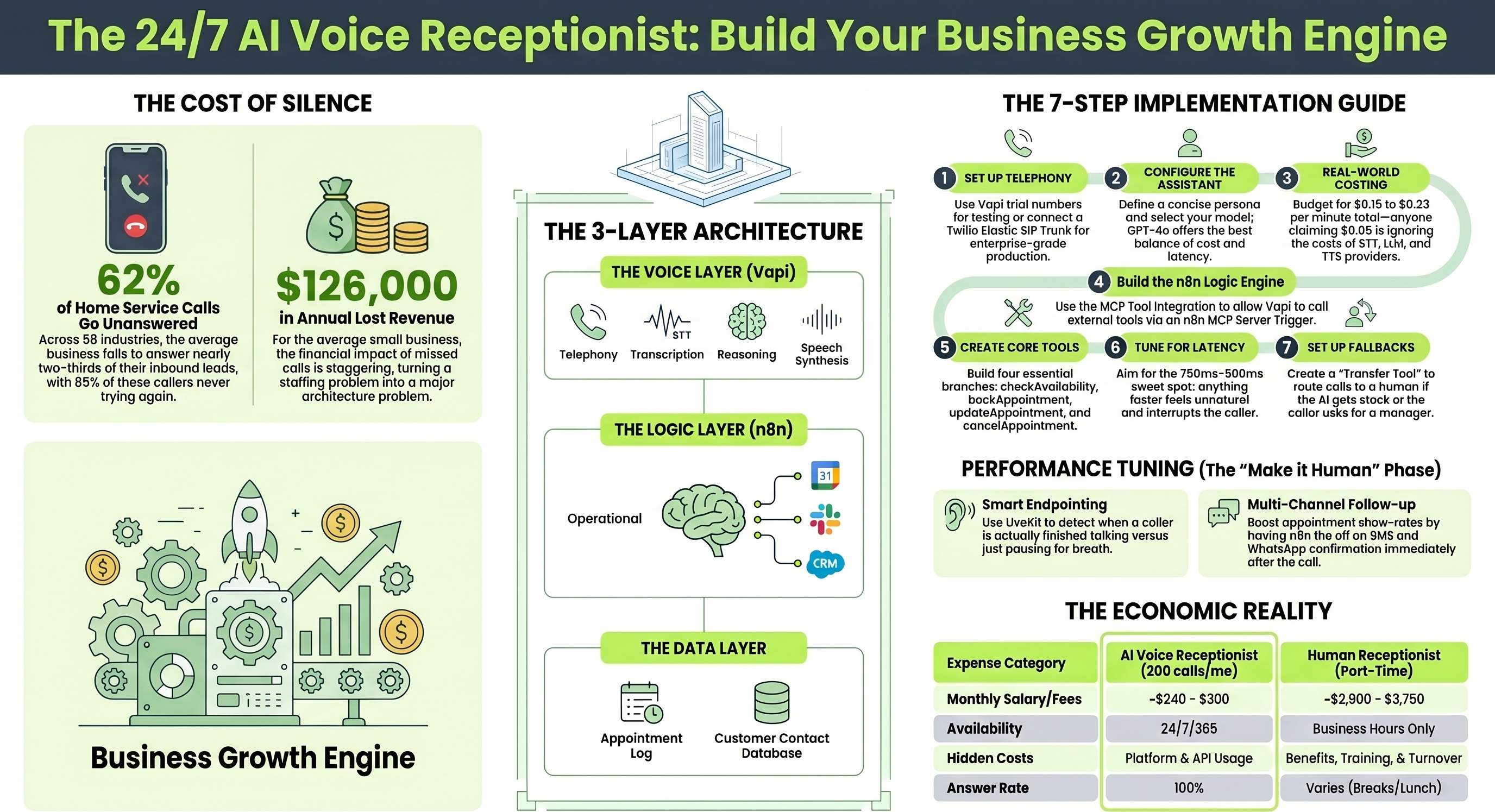
Here is a number that should make every business owner uncomfortable. According to a 411 Locals study that monitored 85 businesses across 58 industries over 30 days, the average business answers only 37.8% of inbound calls. Home service companies miss 62% of theirs. The cost: roughly $126,000 in lost revenue per year for the average small business, with 85% of unanswered callers never trying again. They just dial the next result on Google.
The cleaning business owner Larry, profiled in Entrepreneur magazine in January 2026, was missing 8 to 10 calls per week between job sites and after hours. After deploying an AI voice agent, he stopped losing those leads, started booking appointments while his team was driving between jobs, and improved customer satisfaction without hiring anyone. His story is not unusual. It is becoming the default playbook.
This guide walks through building exactly that kind of system. The combination is Vapi (the voice layer) and n8n (the logic layer), and by the end of this post, you will have a clear blueprint for a receptionist that answers calls instantly, checks your calendar, books appointments, sends confirmation emails, and logs everything to your CRM. No headcount required.
The 2026 Tech Stack: How the Architecture Actually Works
A modern AI voice receptionist has three layers, and the cleaner you keep that separation, the easier debugging gets when things break in production.
The voice layer (Vapi) handles telephony, speech to text transcription, language model reasoning, and text to speech synthesis. Think of it as the part that listens, thinks, and talks. Vapi orchestrates these pieces but does not own them. You bring your own STT provider (Deepgram, AssemblyAI), your own LLM (GPT-4o, Claude, Gemini), and your own TTS engine (ElevenLabs, PlayHT, Cartesia).
The logic layer (n8n) is the operational brain. When your AI needs to check a calendar, look up a customer, or send a confirmation email, n8n is where that logic lives. It connects to Google Calendar, Airtable, Gmail, Slack, your CRM, or anything else with an API.
The data layer is wherever your business actually stores information: Google Calendar for appointments, Airtable or Google Sheets for call logs, your existing CRM for contacts. The receptionist reads from and writes to these systems through n8n.
The split matters because each piece has different failure modes. When latency goes bad, the problem is usually in the voice layer. When the AI books the wrong slot, the problem is usually in the logic layer. Keeping them separate makes the diagnostics tractable.
Step 1 · TelephonySetting Up Telephony and the Phone Number
Your voice agent needs a phone number that can receive calls. Two paths work here.
The quick start path: Vapi provides free trial numbers directly in the dashboard. Provision one in the Numbers tab and you can start testing immediately. This is fine for development and demos.
The production path: Connect a Twilio Elastic SIP Trunk for proper enterprise grade telephony. The setup goes like this. Log into Twilio and create a new Elastic SIP Trunk. Whitelist Vapi's static SIP server IPs (44.229.228.186 and 44.238.177.138) so the trunk can accept outbound requests. Then create a SIP Trunk Credential in your Vapi dashboard and register your Twilio phone number so Vapi can route audio correctly.
One caveat worth knowing upfront: Vapi's native phone number availability is currently limited to the United States and Canada. If your business operates outside those regions, you will need to use the SIP trunk approach with a carrier that serves your country.
Step 2 · Vapi assistantConfiguring the Vapi Assistant
The actual setup of the conversational layer takes about 15 minutes. You are essentially giving the AI three things: a personality, a brain, and a voice.
System prompt: Write a concise persona that defines business hours, standard conversation flows, and rules for handling edge cases. The temptation is to make this comprehensive. Resist it. Long system prompts increase token costs on every turn and slow response times. Vapi reviewers have repeatedly found that overstuffed prompts hurt more than they help. Keep it tight.
Model selection: This is where the cost and latency tradeoffs live. In Vapi's own dashboard, choosing OpenAI's GPT-4o resulted in $0.22 per minute with 700ms latency in one comprehensive 2026 review. Switching to the o1 preview model pushed latency to 8 seconds, completely unusable for natural conversation. For most receptionist use cases, GPT-4o or Claude Sonnet 4.6 hit the right balance. Lighter models like GPT-4o mini or Haiku work for simple booking flows if you need to optimize cost.
Voice selection: ElevenLabs and PlayHT are the most common choices for natural sounding output. Cartesia is gaining traction for very low latency deployments. Match the voice to your brand and the language your callers actually speak. A French restaurant in Brussels needs a French voice with proper accent, not a translated English one.
Step 3 · True costsThe Real Cost Conversation Most Guides Skip
Vapi advertises $0.05 per minute. That number is technically correct and practically misleading.
The $0.05 covers only Vapi's orchestration: managing the WebSocket, keeping latency low, stitching together the other providers. Everything else gets billed separately by third party services you select.
Real all in cost typically lands at $0.15 to $0.33 per minute, with most production deployments clustering at $0.23 to $0.33. Here is what builds up:
- STT runs $0.005 to $0.01 per minute through Deepgram or AssemblyAI.
- LLM inference varies wildly based on model choice (GPT-4o is significantly more expensive than Haiku).
- TTS through ElevenLabs Turbo costs around $0.07 to $0.10 per minute.
- Telephony through Twilio adds $0.014 per minute plus the cost of the phone number itself.
At 2,000 minutes per month, this works out to roughly $260 to $620 in total platform costs. Budget at the higher end during your first month while you tune model choices.
Anyone telling you Vapi runs at $0.05 per minute is either selling you something or has not read their own invoice.Step 4 · Logic engine
Building the n8n Logic Engine with MCP
This is where the real work happens. The connection between Vapi and n8n is what turns the AI from a chatbot into a useful business tool.
Two integration patterns exist, and they are easy to confuse. The Vapi MCP Server exposes Vapi's own APIs (like create_call) as tools for external clients like Claude Desktop. That is not what you want here. What you want is MCP Tool Integration, where the Vapi assistant acts as a client calling external MCP servers like the one n8n exposes.
Here is how to wire it up:
- Create an n8n MCP Server: In n8n, create a new workflow and add an MCP Server Trigger node. This node generates a unique URL that Vapi will call when the assistant needs to use a tool. The trigger acts as the entry point for all tool calls from Vapi into n8n.
- Define the tools as workflow branches: Each tool becomes a path in your n8n workflow. Use a Switch node to route incoming requests based on the tool name Vapi sends. Each branch handles a specific operation (check calendar, book appointment, send confirmation, log to CRM).
- Connect Vapi to the MCP server: In Vapi's tool settings, add an MCP integration. Paste your n8n server URL and provide an authorization header using your n8n API key as a Bearer token. Vapi will discover the available tools automatically.
Known gotcha: If you are self hosting n8n, make sure you are using a recent version with the streamable HTTP protocol. The older SSE (Server Sent Events) protocol has been deprecated. Connection errors mentioning "protocol not supported" or "Failed to fetch" almost always trace back to this version mismatch.
Step 5 · Core toolsCreating the Core Assistant Tools
For a working receptionist, you typically need four tools. The first two are essential. The other two make the experience feel professional.
checkAvailability
When a caller asks for an appointment, Vapi passes the requested date and time to n8n. The workflow queries Google Calendar for busy slots during that window, calculates what is actually open, and returns the available windows in natural language for the AI to speak back to the caller. The response should sound human ("I have 2 PM or 4 PM open this Thursday") rather than robotic ("AVAILABLE_SLOTS: 14:00, 16:00").
bookAppointment
Once the caller agrees to a time, Vapi triggers this tool with structured parameters: startDateTime, clientName, clientPhone, clientEmail, serviceType. The n8n workflow creates the Google Calendar event, sends an HTML confirmation email through Gmail, and adds a record to your CRM or Airtable. All in one branch, all triggered by a single voice intent.
updateAppointment and cancelAppointment
These handle the inevitable "I need to reschedule" calls. The pattern matches the existing n8n receptionist template that has been deployed across hundreds of small businesses: same Switch node routing, just different branches for the update and delete operations.
A real world reference architecture worth studying: the n8n community template "Agent Receptionist" handles exactly this workflow with GetSlots, BookSlots, UpdateSlots, CancelSlots, and an end of call report. It is the closest thing to a battle tested starting point for solo operators.
Step 6 · LatencyLatency Tuning (This Is Where Most Builds Fail)
Bad latency kills voice agents faster than anything else. Callers will tolerate a slightly robotic voice. They will not tolerate awkward 2 second pauses after every sentence.
The conventional wisdom is "aim for sub 500ms." Reality is more nuanced. One thorough 2026 Vapi review found that pushing latency below 750ms actually backfires. The assistant becomes unnaturally quick, interrupts callers, and creates conversational chaos. The actual sweet spot lands between 750ms and 900ms.
Vapi gives you specific controls for this:
Start Speaking Plan
This controls when the assistant replies after the caller stops talking. The default 0.4 second wait works for most cases. Enable Smart Endpointing (LiveKit is the default for English) to detect when a caller has actually finished a thought rather than just paused to breathe. This is the difference between a natural conversation and one that constantly cuts people off mid sentence.
Stop Speaking Plan
This handles interruptions. If the user starts talking, the bot should yield the floor fast. Setting numWords to 0 with voiceSeconds of 0.2 makes the assistant stop within 50 to 100ms of hearing the caller. But you also want to filter out filler. Setting numWords to 2 means the AI ignores single word interjections like "uh huh" or "okay" and only stops speaking when the caller is actually saying something substantive.
This is the tuning that separates a demo from a deployable system. Budget two or three test calls just to get this right.
Step 7 · FallbacksFallbacks and Post Call Analytics
Even the best AI cannot answer every question, and pretending otherwise is how you lose customers permanently.
Graceful handoff
Configure Vapi's transfer tool to route the call to a human (your mobile number, a sales rep, your support line) when the caller explicitly asks for a person or the AI detects it is stuck. The trigger phrases that should always escalate: "speak to a manager," "is anyone there," "this is not working," and three consecutive failed tool calls in a single conversation.
End of call reports
Configure a webhook in Vapi to send the full call transcript, AI generated summary, and call outcome to an n8n endpoint after every conversation ends. n8n then logs this directly to Google Sheets, Airtable, or your CRM. For an outbound calling setup like the real estate lead automation pattern (where AI agents call leads every few minutes during business hours and book appointments through Calendly), this post call data feeds back into the lead scoring system for tomorrow's calls.
Multi channel follow up
When an appointment gets booked, do not just send an email. Fire off an SMS through Twilio and, if you have it configured, a WhatsApp message. The redundancy reduces no shows significantly because the confirmation reaches the customer wherever they actually check messages.
What This Actually Costs to Run
For a small service business handling 200 inbound calls per month at an average of 3 minutes per call (600 total minutes), here is the realistic monthly bill:
- Vapi platform fees at $0.05 per minute: $30.
- LLM costs (GPT-4o or Claude Sonnet): roughly $90 to $140.
- STT (Deepgram Nova): around $30.
- TTS (ElevenLabs Turbo): roughly $50 to $60.
- Twilio telephony (phone number plus per minute): around $20.
- n8n cloud hosting: $20 (or $0 if you self host).
- Google Workspace tools: covered by your existing subscription.
Total: roughly $240 to $300 per month for a system that handles 200 calls.
Compare that to the $35,000 to $45,000 annual cost of a part time receptionist (per the Medium analysis on missed call economics), plus benefits, training, lunch breaks, sick days, and turnover. The economics are not subtle.
The Honest Bottom Line
This stack is not a magic wand. It will not handle every conversation gracefully on day one. It needs tuning. It needs a real fallback to a human for the calls that matter most. And it needs you to actually listen to the first hundred recorded calls and fix the patterns you find.
But it does answer every single inbound call within one ring. It does book appointments at 2 AM on a Tuesday. It does not get sick, quit, or take vacations. For the 62% of calls that small businesses currently miss, that alone is the difference between flat revenue and growth.
The 40% to 62% missed call problem is not a staffing problem. It is an architecture problem. Vapi plus n8n is the architecture that solves it.